Everything NS3 does today
Every feature on this page is in NS3 now and included in the one monthly price. If something you need isn't here, ask us — we'll tell you straight whether it is coming.
Jobs and engineers
From the phone call to the finished job, in the office and on the engineer's phone.
Jobs from fault to finish
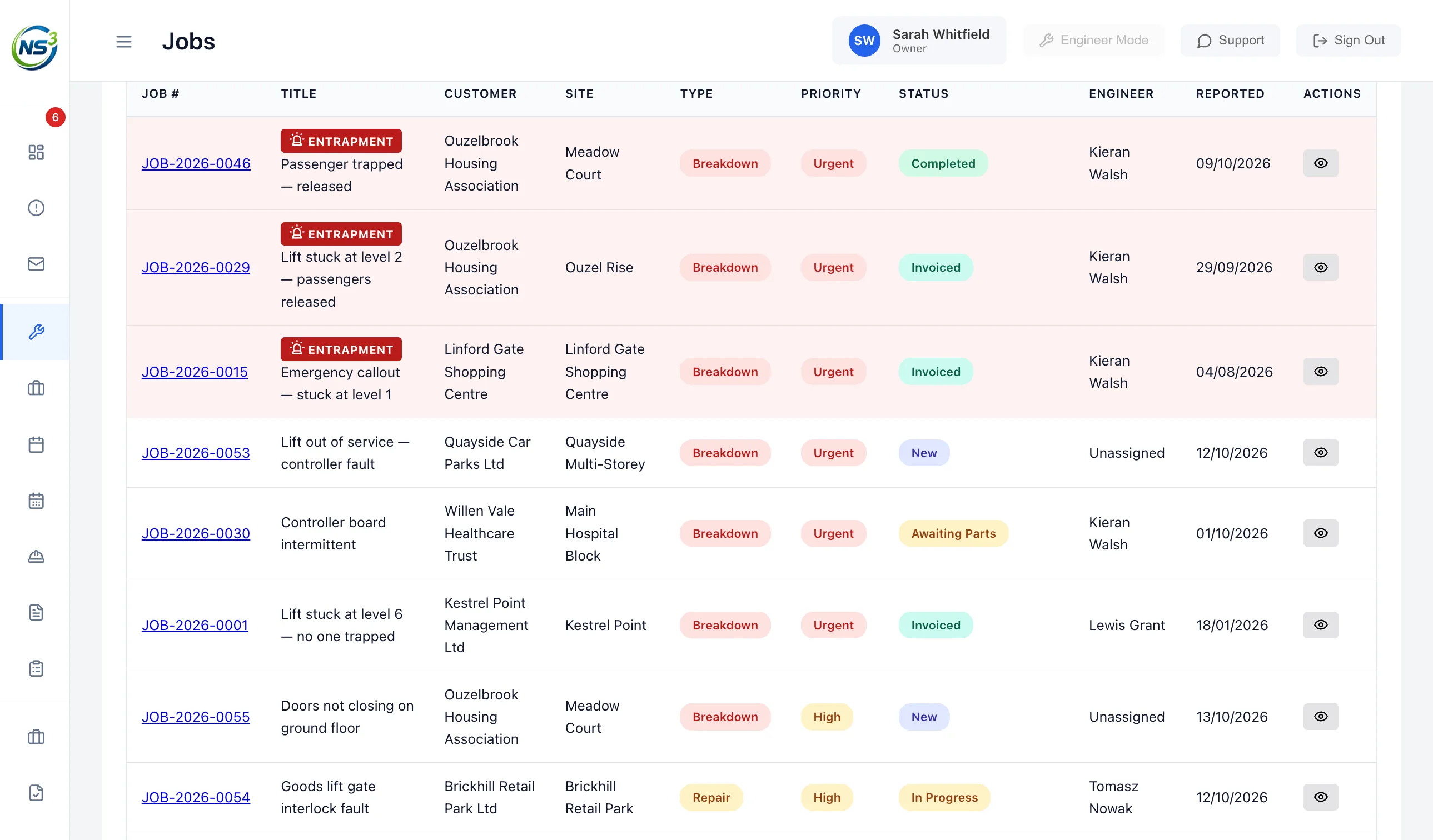
Book a job against the customer, site and lift. Every job has a clear status — new, scheduled, in progress, awaiting parts, awaiting office review, completed, invoiced — so everyone knows where it stands.
Assign and schedule
Choose the engineer and the time. Visits appear on the planner by day, week or month, alongside leave, training and meetings so nobody is double-booked.
The engineer app
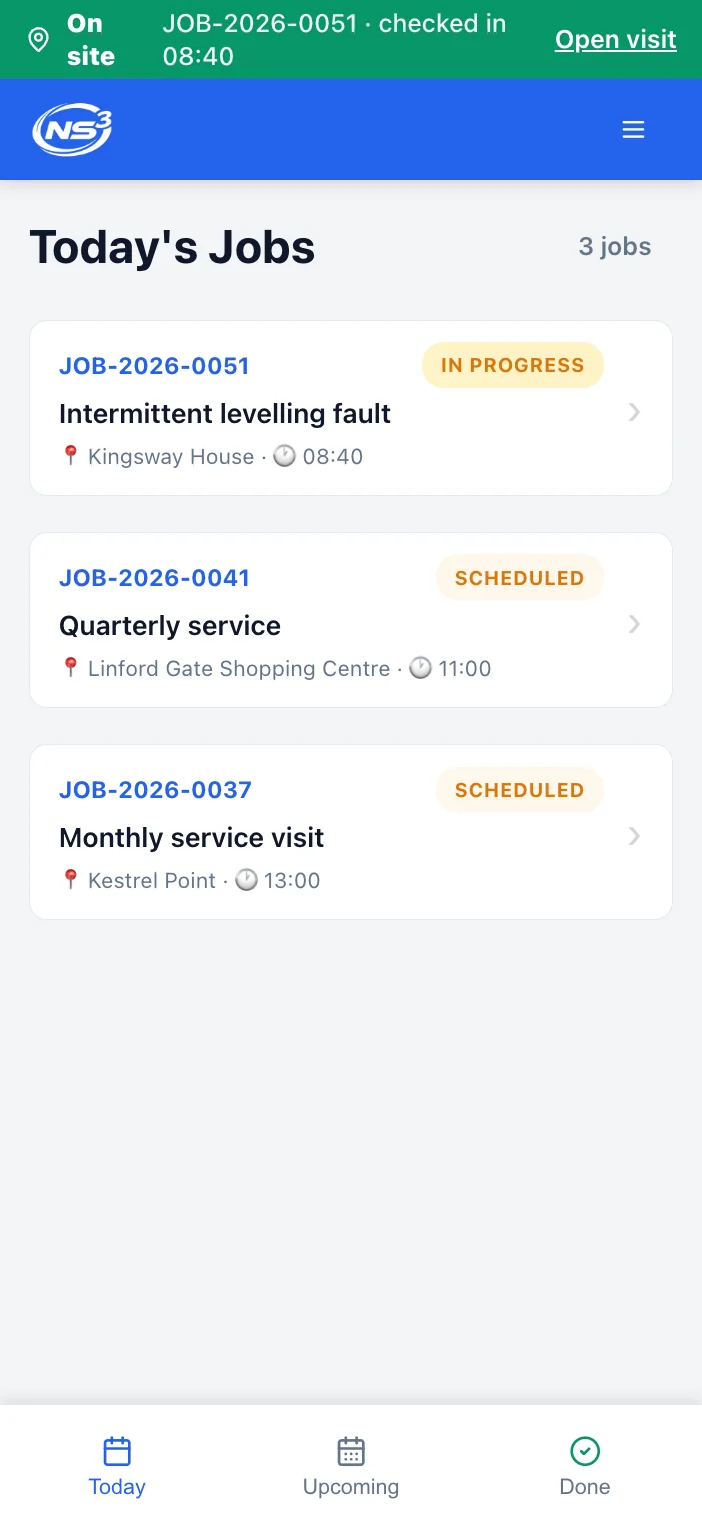
Engineers see their own jobs on their phone — today, upcoming and done — and check in on arrival and out with an outcome when they leave.
Activity reports and forms
Build your own form templates. Engineers complete them on site, save as they go and take the customer's signature.
Photos and parts from site
Engineers take photos and record the parts they use on the visit, from your parts list or typed in.
Labour and materials
Record labour — standard, overtime, travel and call-out — and parts against each visit, ready to carry onto the invoice.
The office has the last word
A job fixed on site waits for the office to check it before it is completed and ready to invoice.
Parts and van stock
A parts inventory, stock on each van and low-stock alerts. Keep a record of the subcontractors you use as well.
Planned maintenance and compliance
Every lift, every date, every renewal — and a warning before anything lapses.
PPM schedules
Set the client, site, tasks, frequency and start date, and NS3 keeps track of when each visit is next due.
LOLER and insurance dates
Recorded on each lift. Expired certificates and those due within 30 days are on the Needs attention screen, and NS3 alerts the office 30 days ahead — in the app and by email.
A health score for every lift
Each lift scores out of 100, losing points for being out of service, for expired or expiring certificates, overdue service and age.
Every lift in one list
All the lifts you maintain, wherever they are, with filters for compliance sweeps.
Who's calling?
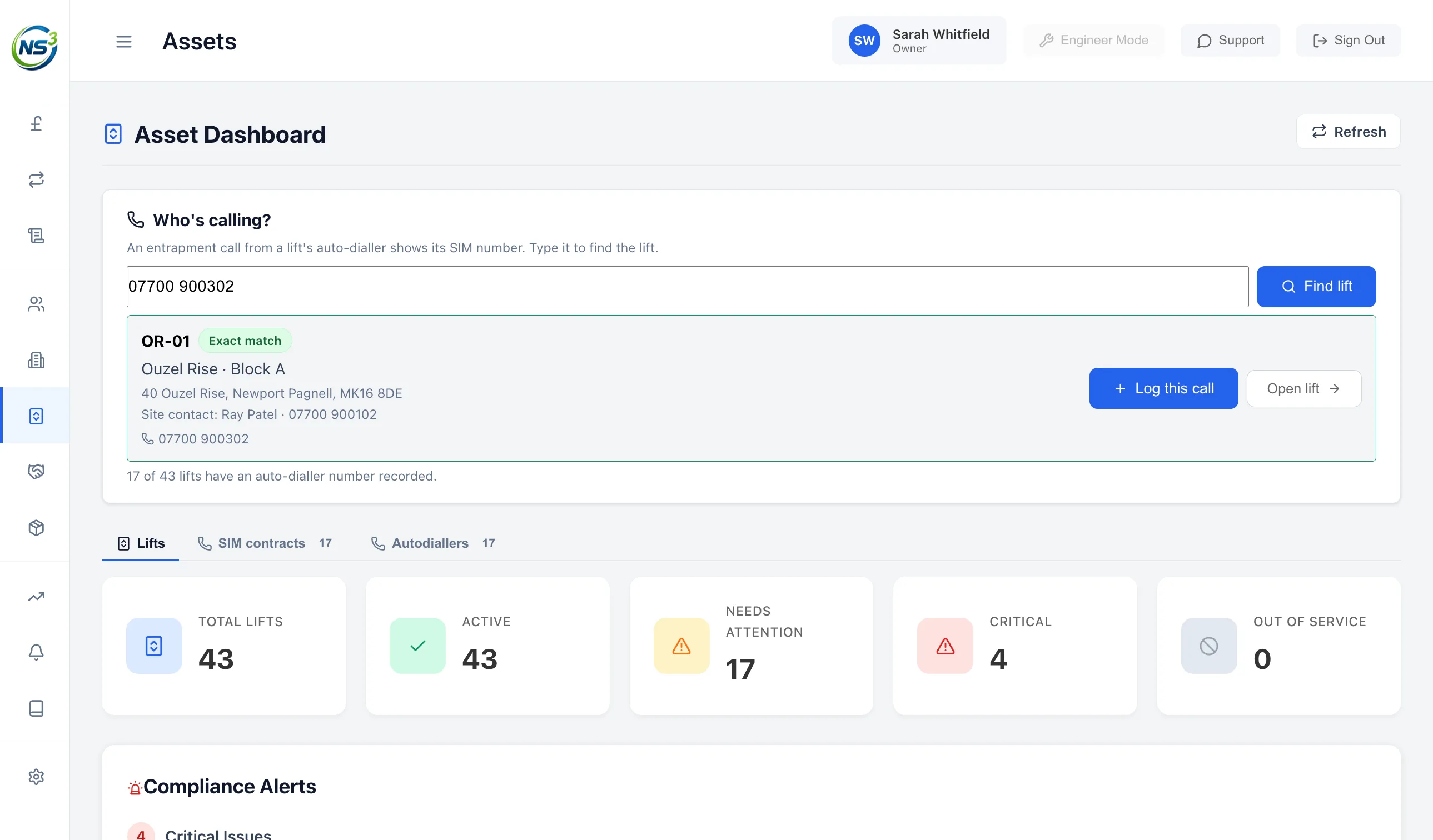
Type the number on an incoming auto-dialler call to find the lift, its site address and the site contact.
Auto-dialler SIM contracts
The network, supplier, SIM serial, monthly cost and renewal date for each lift's SIM, with a warning 60 days before it renews. If a dialler is swapped, the SIM moves with its contract details.
Documents on each lift
Keep certificates, reports and drawings with the lift they belong to.
Site surveys
Survey a site lift by lift, save as you go, and produce a PDF at the end.
Quotes, invoices and money
Quote it, do it, invoice it, get paid — and know what is outstanding.
Quotes customers can accept online
Type the lines or pick them from your own library so the wording stays consistent. Email the quote or send a link, and the customer can accept it online.
Invoices straight from the job
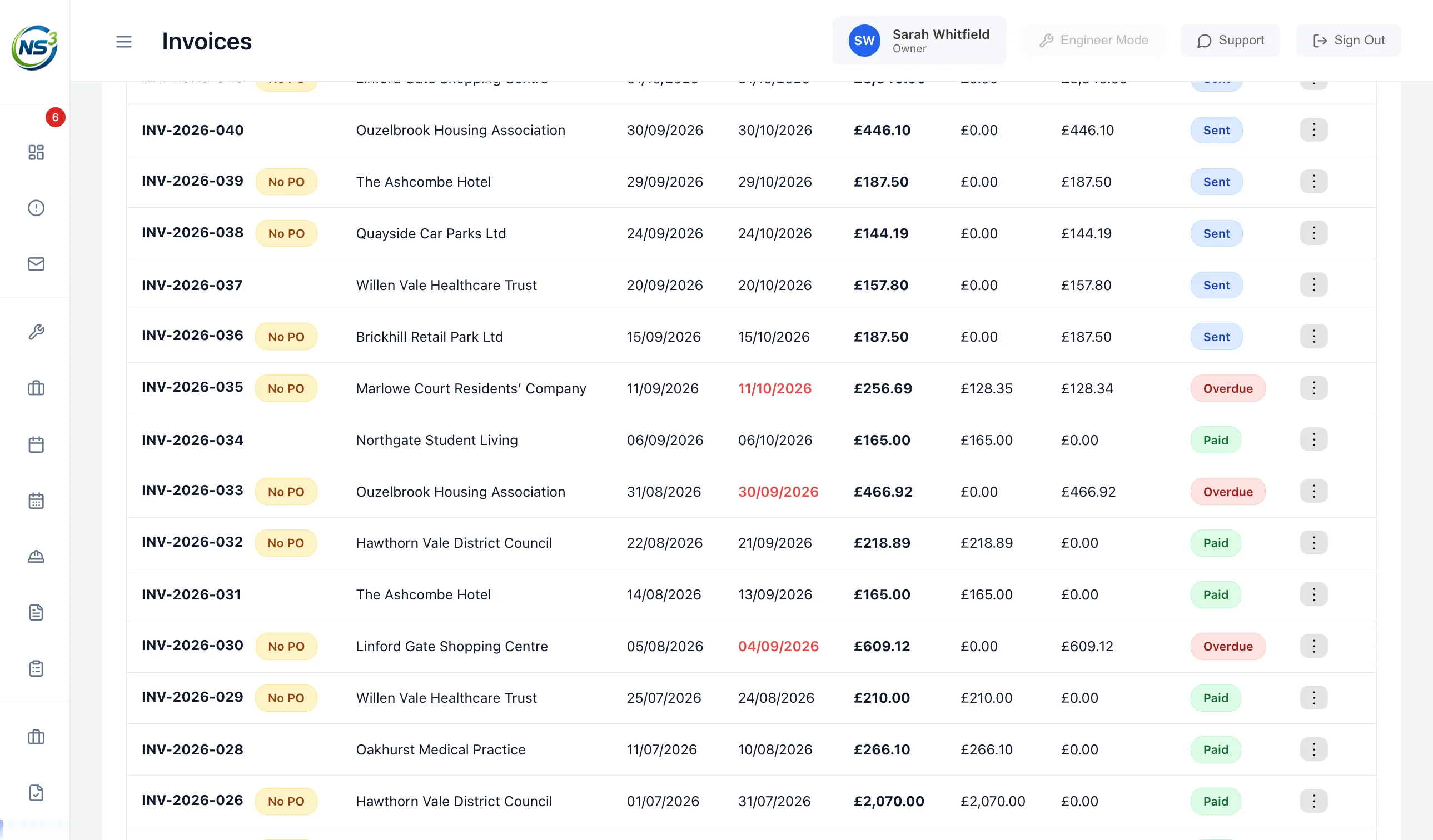
Generate an invoice from a completed job and the labour, parts and the customer's purchase order number carry across.
Invoices in your name
Your company's address, contact details and bank details on every invoice. Email it or download the PDF.
Payments and overdue invoices
Record full or part payments. Overdue invoices are flagged on Needs attention and the office is told when one goes overdue.
Recurring invoices
Contract fees billed on a regular cycle, without raising each one by hand.
Maintenance contracts
Record what is covered, for which sites and on what terms.
Reports
Financial, maintenance and operational reports for any date range, each exportable to CSV.
Leads
Track an enquiry through your pipeline and convert it to a client when you win the work.
Your customers
Give your customers their own view, on your terms.
A customer portal
Each customer login sees only that customer's records: their sites, lifts and invoices, the jobs you choose to share, and engineer reports if you switch them on.
Breakdown requests
Customers can report a breakdown from the portal. It appears on your Needs attention screen and as a notification, and you raise the job.
Customers kept informed
They can see in their portal when a job is booked in or completed, an invoice is raised, paid or overdue, or a quote is sent — worded for a customer, never your internal notes. You choose which of these they see.
Drafts stay private
A draft invoice stays out of the customer's portal until it has been sent, and jobs are hidden from customers unless you choose to share them.
Projects
For modernisations, new lifts, major repairs and safety upgrades.
Stages and checklists
Each company sets up its own project templates, starting from six ready-made ones, with sign-off checklists at each stage.
A programme
Planned against actual dates, with the jobs and visits that do the work.
The money on a project
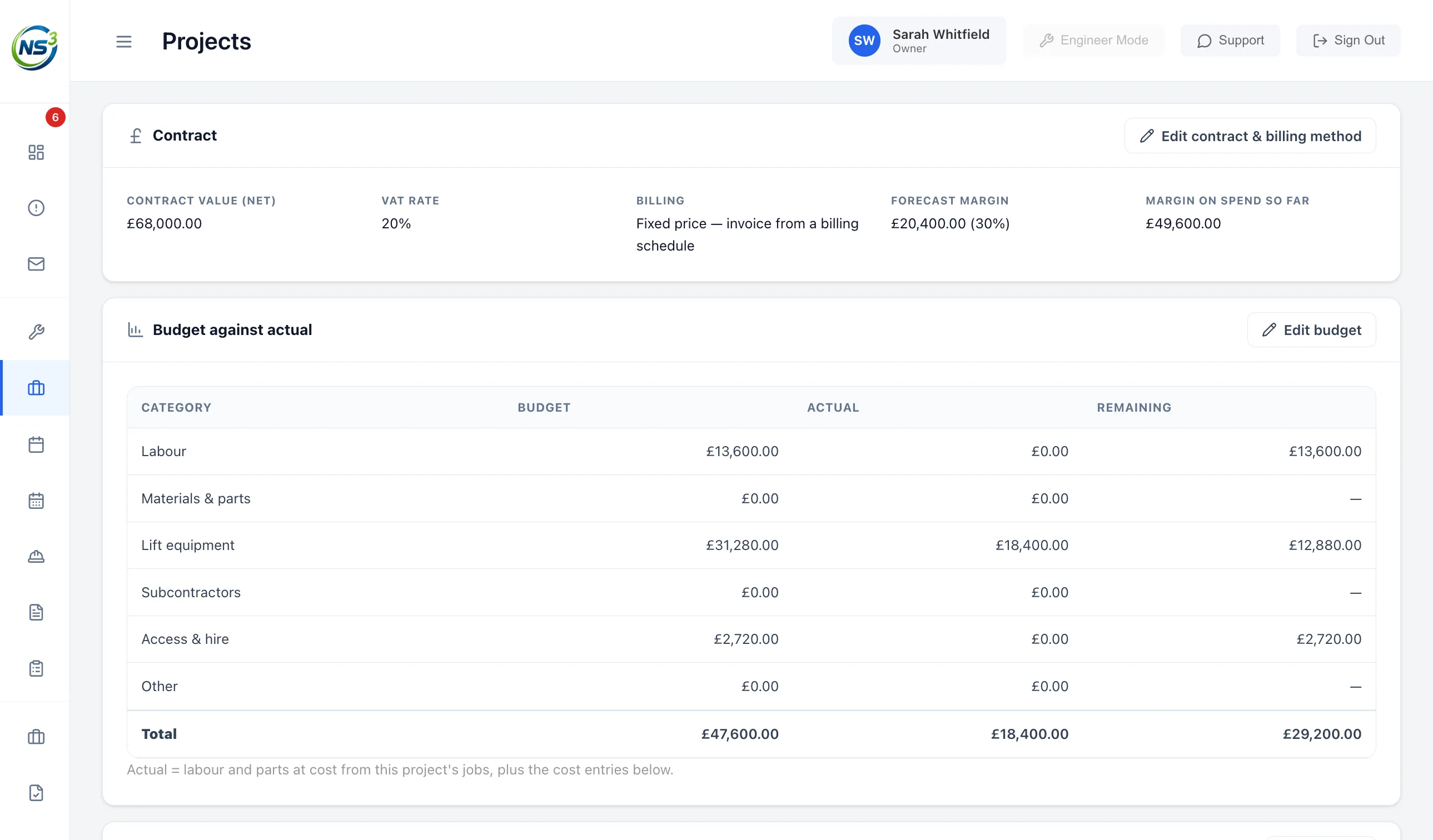
Contract value against a budget, what has actually been spent and the margin so far, with deposit and stage payments that each become an invoice when due. A fixed-price project's jobs are never invoiced twice.
Issues and snags
Record issues and snags with photos — engineers can report a snag from site.
Project documents
Drawings, certificates and manuals kept together, with versions, shared with engineers when you choose and filed on the lift.
Handing over a new lift
NS3 creates the lift's record so its history starts on day one, and produces a handover pack PDF listing the documents and every signed-off checklist line.
From quote to project
Turn an accepted quote straight into a project.
Mail, alerts and automation
Your company's email and NS3's alerts, in the same place as the work.
The company mailbox inside NS3
Connect the company mailbox once, then read, search, reply, forward, file and draft mail without leaving NS3, on a computer or a phone. NS3 keeps the last 90 days and checks every 15 minutes.
The mailbox stays in charge
What you do in NS3 happens in the mailbox too, so your phone agrees. Mail sends through your own email server, from your own address.
Private by default
Pictures that would tell a sender you opened their message stay hidden until you choose to show them. Messages from your clients show which client they are.
Alerts that reach the right people
A job assigned, an engineer finishing on site, an invoice going overdue, a quote accepted, a breakdown reported, a LOLER or insurance date coming due — in the app, and by email where you want it. Each company chooses who hears about what.
Automation
When a job is raised or changes status, an invoice is raised or paid, or a new lead arrives, NS3 can notify people, send an email or update the record — built from plain-English choices, no code.
Emails from your own address
Send NS3's emails through your own email server, so they come from your company.
Your company, your people, your data
Set NS3 up the way your company works.
Unlimited users
Everyone in the company can have their own login — office, engineers and managers — at no extra cost.
Roles and permissions
Owner, Manager, Admin, Engineer and Read Only, with each company choosing what each role can see and do, and exceptions for named people. Roles are enforced by the database, not just hidden on screen.
Your data kept separate
Each company's records are kept apart from every other company's, and that separation is enforced in the database itself.
Passwords locked away
The passwords for your email server and mailbox are stored encrypted and never shown on screen again.
Help on every screen
A question mark on every screen opens the help guides for it — and you can write your own "how we do things here" guides for your team.
Your details and your logo
Your company details and bank details on your invoices and quotes, and your logo on your mail signature.
See it for yourself
We'll show you NS3 with your kind of work and answer your questions. £299 a month for the whole company when you're ready.